Works with Claude, ChatGPT and Gemini
Turn your exercises into a guided routine.
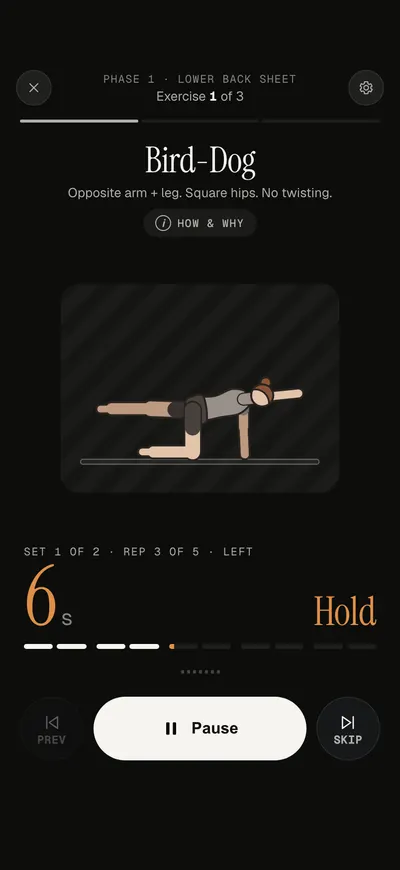
Bring a routine from your AI chat, or ask your assistant to turn your physio's sheet into one. Corset guides you through the exercises with animated figures, timers and voice cues, then records how you feel.
Free for now. No Corset account needed.
Use it in your browser today. Android is coming; iPhone follows later.
How it works
From your AI chat to a session you can follow
-
Bring your routine
Ask your AI assistant to put your exercises in Corset. Start with your physio's sheet, an exercise list or a routine from your chat.
-
Review and add it
Open the link from Claude, or paste the answer from another AI. Check the exercises, reps and timings before you add the routine.
-
Follow the session
Corset counts the reps and times the holds and rests. Check in afterwards to keep a record of your sessions and how you feel.
Your own exercises
Bring the routine you already have
Use Claude to turn your exercises into a routine link that opens in Corset. If you use ChatGPT, Gemini or another assistant, Corset gives you a message to copy into the chat.
- Start with a physio's sheet, an exercise list or a routine from your chat.
- Review the exercises, reps and timings before you add it.
- Exercises Corset recognises get a figure and voice cues. Others use written instructions and a timer.
Your AI assistant

Put these exercises in Corset
Corset routine
Lower back sheet
Open in CorsetGuided exercises in Corset
A starting point if you need one
No routine yet?
Try a ready-made routine to see how Corset guides you. Choose a preview, then check the exercises and timings in the app.
-
Easy mobility
Morning Reset
Breathing and gentle spine movement after waking.
Preview routine -
After screen time
Desk Survival
Chest, upper back and neck movement after a day at a desk.
Preview routine -
Bodyweight fitness
7-Minute Workout
A classic bodyweight circuit. Skip it during a flare-up.
Preview routine
At your pace
There’s room for rest days
You can take time off or ease back without falling behind your weekly target.
Saved on your device
Your routines and check-ins are saved on this device. Export a summary to discuss with your physio, and save a backup before changing phones or clearing browser data.
Free while we’re getting started
All routines and features are currently free. No account or payment details needed. Any future pricing will be explained here.
Before you start
Corset is exercise guidance, not medical advice. It doesn't check whether a routine suits you. Stop if something hurts sharply.
See the warning signsCommon questions
Do I need to use AI?
No. You can choose a library routine and start in Corset. An AI assistant is an optional way to turn your own exercise sheet into a routine the app can read.
What does the progress record tell me?
It shows the sessions you completed and your answers about how you feel over time. That gives you something concrete to look back on or discuss with your physio. It doesn't establish why things changed or whether an exercise is right for you.
Can I use Corset on my phone?
Yes. Open Corset in Safari, Chrome or Edge, and add it to your home screen if you'd like. After the first load, sessions at the default voice pace and your log work offline. The Android app is coming to Google Play; an iPhone app follows later.
Put your exercises in Corset
Bring your routine over from your AI chat and try a guided session.